Moody is not a passive note taker. Inside a MoodLens call, Moody becomes a real-time AI teammate that can listen, respond, understand workspace context, follow screen shares when enabled, and help teams move from discussion to execution.
Quick answer
Moody is the AI meeting assistant built into MoodLens calls. You can invite Moody into a live call, ask it questions by voice or chat, let it understand the active workspace and channel, give it screen-share context when enabled, and use it to clarify work while the meeting is still happening.
That makes Moody different from a passive meeting transcription bot. Moody is connected to the place where the work continues after the call: tasks, boards, docs, channels, AI Employees, and workspace memory.
What is Moody inside a meeting call
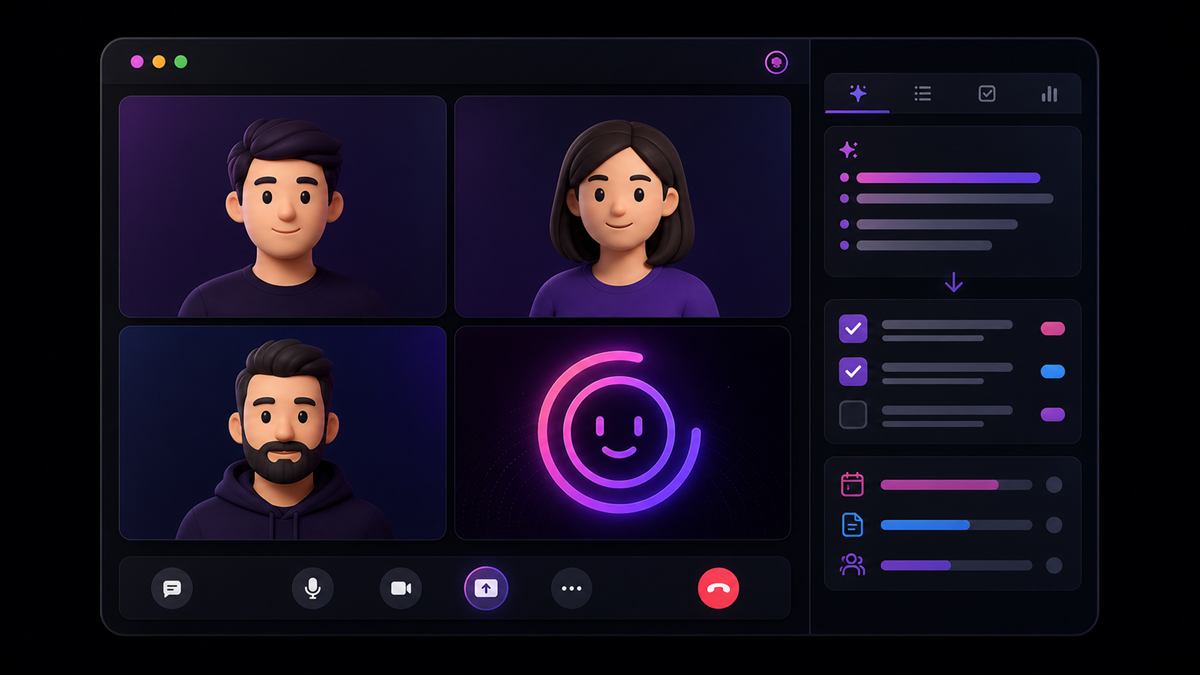
Moody is the AI teammate inside MoodLens Todo. In a meeting call, Moody can be invited like a participant and appear as a visible AI presence in the call interface with its own avatar, AI badge, connection state, and disconnect control.
The goal is not to add another recorder to the room. The goal is to give the team an assistant that understands the meeting while the meeting is happening and can help the conversation become clearer work.
Ask Moody questions during the call.
Clarify tasks, blockers, owners, and next steps.
Use the current workspace, channel, task context, and recent memory.
Respond in the selected language or auto-detect the meeting language.
Use screen-share context when screen sharing is active and workspace settings allow it.
Why this is different from a normal AI meeting bot
Traditional AI meeting bots usually work after the conversation. They join, listen, generate notes, and send a recap. Moody is different because it works inside the operating layer of the team.
Inside MoodLens, the call is already connected to the current workspace, active channel, team members, selected task context, chat messages, and prior Moody memory. Moody is not guessing what the meeting is about from audio alone. It can use the surrounding project context.
Real-time AI help during the call
In a MoodLens call, users can mention Moody from the meeting chat with @moody. Moody reads the question, considers recent call chat, workspace context, task context, and memory, then replies directly in the channel.
That helps when the team needs a decision restated, a blocker clarified, a follow-up message drafted, or a risk summarized before the meeting moves on.
Ask what the team decided about a timeline, blocker, client update, or launch plan.
Turn a messy discussion into clearer next steps.
Draft follow-up messages while the call is still active.
Support direct task workflow actions from call chat when the instruction is explicit.
Screen-share context and multilingual meetings
When screen sharing is active and workspace settings allow it, MoodLens can send screen-share frames to Moody. This gives Moody visual context about what the team is reviewing, such as a dashboard, board, document, design, report, roadmap, bug, or product flow.
MoodLens also supports language control inside calls. Moody can auto-detect language or respond in a selected language, which makes it useful for international teams that do not always work in English.
Memory, copyable outputs, and execution
Moody can use recent channel memory to avoid starting from zero every time. It can understand what was discussed last time, which participants were involved, and which recurring blockers keep appearing.
MoodLens can also surface useful Moody outputs in a smart clipboard panel. Client updates, follow-up messages, action plans, email drafts, decisions, and technical snippets can be copied while the meeting is still happening.
That is the bigger value: MoodLens keeps the intelligence where the work is happening. Meetings, tasks, boards, docs, AI Employees, channels, and follow-up live together.
Best use cases
Moody inside calls is especially valuable for meetings where decisions, owners, context, or follow-up matter. It is built for teams that need meetings to turn into action instead of disappearing into memory.
Startup operating meetings and founder updates.
Product and engineering standups.
Client review calls and agency delivery meetings.
Project planning, sprint planning, and bug triage.
Design reviews, roadmap reviews, and internal decision meetings.
FAQ
What is Moody in MoodLens? Moody is the AI assistant inside MoodLens. In meeting calls, Moody can join as an AI participant, respond to questions, use workspace context, understand screen-share context when enabled, and help teams turn discussion into clearer work.
Is Moody just a meeting transcription bot? No. Moody can support real-time conversation, meeting chat, task workflow context, workspace memory, screen-share context, language control, and copyable outputs.
Can Moody see my screen during a call? Moody can receive screen-share context when screen sharing is active and the workspace allows it. Teams can control this behavior through workspace settings.
Can Moody help with tasks during a meeting? Yes. When users give clear task workflow instructions in the call chat, Moody can help update task workflow state and connect the meeting to execution.
Related MoodLens pages
Bring AI workflow automation into one workspace
Use MoodLens to connect AI execution, project planning, team alignment, and operational follow-up in one shared system.
Try MoodLens free → moodlenstodo.info