Automating your developer workflow with AI means deploying intelligent agents that handle coding, testing, code review, and deployment without waiting for a human to click run.
What AI developer workflow automation means
Automating a developer workflow with AI means connecting agents to the repeatable parts of software delivery: fetching tasks, clarifying requirements, writing code, running tests, opening pull requests, and updating work status.
The shift is structural. Agentic AI adoption has crossed the majority threshold in software teams, and many organizations expect AI agents to support most products within the next two years. The useful question is no longer whether AI can help developers, but which workflow loops are safe and mature enough to automate.
Key tools for AI developer workflow automation
The tooling ecosystem has matured into three practical categories: agentic coding assistants, orchestration frameworks, and task tracker integrations. Each category solves a different layer of the automation problem.
Claude Code, Cursor, and Windsurf represent the current generation of coding agents. Claude Code is terminal-native and composes well with pipelines, while Cursor and Windsurf bring AI coding into the IDE for lower-friction individual productivity.
Claude Code works well when teams want a terminal-native coding agent that can read a codebase, write changes, run commands, and produce commits.
aidev can fetch work from tools like Jira, ClickUp, Trello, and Notion, validate task clarity, call a coding agent, push a branch, and update task status.
karl coordinates multiple Claude Code subagents across planning, architecture, implementation, testing, rework, and deployment.
agentry defines agentic workflows in YAML and can generate GitHub Actions pipelines with sandboxing and output validation.
Cursor and Windsurf are strong entry points for teams that want AI in daily development before restructuring the whole toolchain.
How to design an AI-driven developer workflow
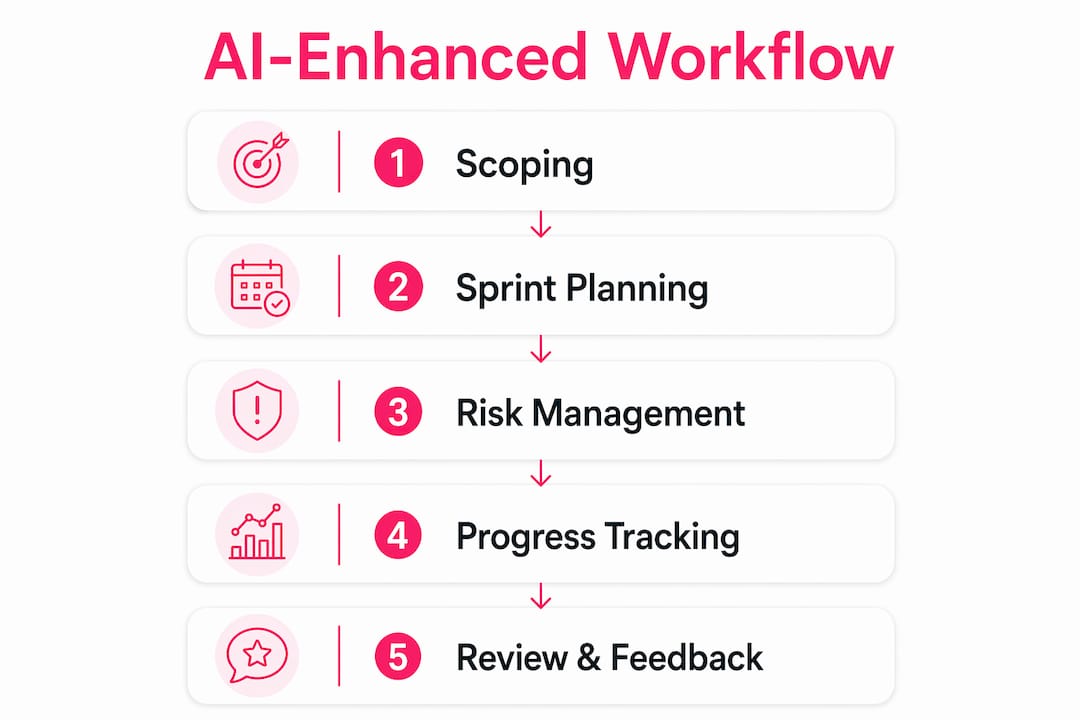
The best workflow is an event-driven agent loop: trigger, fetch, clarify, implement, validate, and merge. Designing that loop matters more than choosing a flashy tool first.
A practical workflow might start when a developer creates a ticket. The agent picks it up, checks whether the task is clear enough to act on, writes the implementation, runs tests, opens a pull request, and moves the ticket to review. The developer reviews the pull request instead of writing every line from scratch.
Connect the task tracker that acts as the source of truth.
Define clarity requirements so ambiguous tasks pause for human input.
Configure the coding agent, allowed directories, commands, and external services.
Run work in isolated environments so agents do not overwrite one another.
Add automated test gates after every implementation.
Decide which changes open pull requests and which require manual approval before production.
Log every agent action so the workflow is auditable.
Security and human oversight best practices
Security is where most AI workflow automation projects fail quietly. The risk is not only bad code. The risk is an agent doing something unintended at scale before a human notices.
Safe automation needs at least two layers: behavioral constraints and OS-level isolation. Permission contracts can define what an agent may modify or run, while containers and sandboxing reduce the blast radius if the agent encounters malicious instructions or unexpected state.
Create a permission contract for every project before running autonomous agents.
Run agents inside isolated environments with restricted network egress.
Set retry limits so failing tasks cannot loop forever.
Log tool calls, command output, file changes, and final summaries.
Require human approval for merges to main branches or production deployments.
Audit agent behavior weekly during the first month of rollout.

Common challenges with multi-agent development
The most common failure mode is coordination breakdown. Two agents can edit the same file, one agent can produce malformed output for another, or a retry loop can keep burning budget without improving the result.
Central orchestration helps because it enforces sequencing, state, permissions, and failure policies. Without that structure, teams get powerful agents but no accountability trail.
Silent failures should become explicit errors with success signals.
Test suite gaming should be blocked with coverage checks and review rules.
Merge conflicts should be flagged quickly instead of retried indefinitely.
Prompt injection from tickets, comments, or source files should be sanitized and constrained.
API cost should be tracked per merged pull request, not only per model run.
Key takeaways
AI developer workflow automation works best when teams treat it as an operating system for repeatable work, not as a magic replacement for engineering judgment.
Start with proven tools such as aidev, karl, agentry, Claude Code, Cursor, and Windsurf.
Design the trigger, clarify, implement, validate, and merge loop before configuring agents.
Layer permission contracts with OS-level sandboxing.
Keep humans in the loop for production changes and ambiguous tasks.
Roll out on low-risk task categories before automating larger feature work.

Why most teams approach AI automation backwards
Many engineering teams evaluate AI workflow tools like any other SaaS product. They compare feature lists, watch demos, and ask whether the tool integrates with the existing stack. That misses the real issue.
The question that matters is what the agent does when it is wrong. Every coding agent will produce incorrect output eventually. The teams that succeed design failure modes before success modes: approval gates, audit logs, rollback procedures, and task clarity standards.
The second mistake is treating agentic AI as a replacement for engineering judgment. Tools like karl and aidev do not make architectural decisions. They execute well-defined tasks quickly. The quality of automation output is directly tied to the quality of tickets, acceptance criteria, and review discipline.
How MoodLens takes AI workflow automation further
Developer workflow automation handles the code. MoodLens handles the work around it. While tools like aidev and karl can automate implementation loops, MoodLens gives your team an AI workforce platform where specialist AI agents, project context, boards, reports, and team alignment live in one shared workspace.
MoodLens is the solution when teams want more than code generation. It helps coordinate projects, automate follow-up, keep work visible, and connect AI execution back to the humans responsible for outcomes. If you are already automating your code pipeline, MoodLens is the layer that helps automate the surrounding planning, collaboration, and operational work.
FAQ
What does it mean to automate developer workflow with AI? It means using AI agents to handle repeatable development tasks, including fetching tickets, writing code, running tests, and opening pull requests, without manual intervention at each step.
Which tools are best for AI developer workflow automation? aidev, karl, agentry, Claude Code, Cursor, and Windsurf are strong options depending on whether the team wants orchestration, terminal-native coding, or IDE-based assistance.
How do you keep AI agents secure in an automated workflow? Combine permission contracts, sandboxed execution, restricted network access, test gates, logging, and human approval for sensitive changes.
What is the biggest risk in multi-agent developer automation? Coordination failures are the most common source of breakdown, especially when agents edit overlapping files or pass malformed outputs to one another.
How long does it take to implement AI workflow automation? Many teams can automate one narrow task category within a few weeks. Full lifecycle automation usually needs a longer rollout with tuning, review, and trust-building.
Bring AI workflow automation into one workspace
Use MoodLens to connect AI execution, project planning, team alignment, and operational follow-up in one shared system.
Try MoodLens free → moodlenstodo.info